
No-Code Messaging Dashboard: Send, Track, and Manage RCS & SMS Conversations in One Place
Pinnacle's no-code conversations dashboard lets you send RCS and SMS messages, track delivery statuses in real time, manage contacts, look up phone numbers, and respond to customers — all without writing a single line of code or building your own messaging UI.
Ivan
What Is Pinnacle's Conversations Dashboard?
Pinnacle's conversations dashboard is a ready-made, no-code messaging interface that lets businesses send, receive, and manage RCS and SMS conversations directly from a web browser. It is included with every Pinnacle account, enabled by default, and requires zero frontend development to use.
Instead of spending weeks building a custom messaging UI — with contact management, message threading, delivery tracking, and phone number lookups — teams can log in and start managing conversations immediately. The dashboard handles everything a business needs to operate a messaging channel day-to-day, from composing rich messages to tracking whether they were delivered and read.
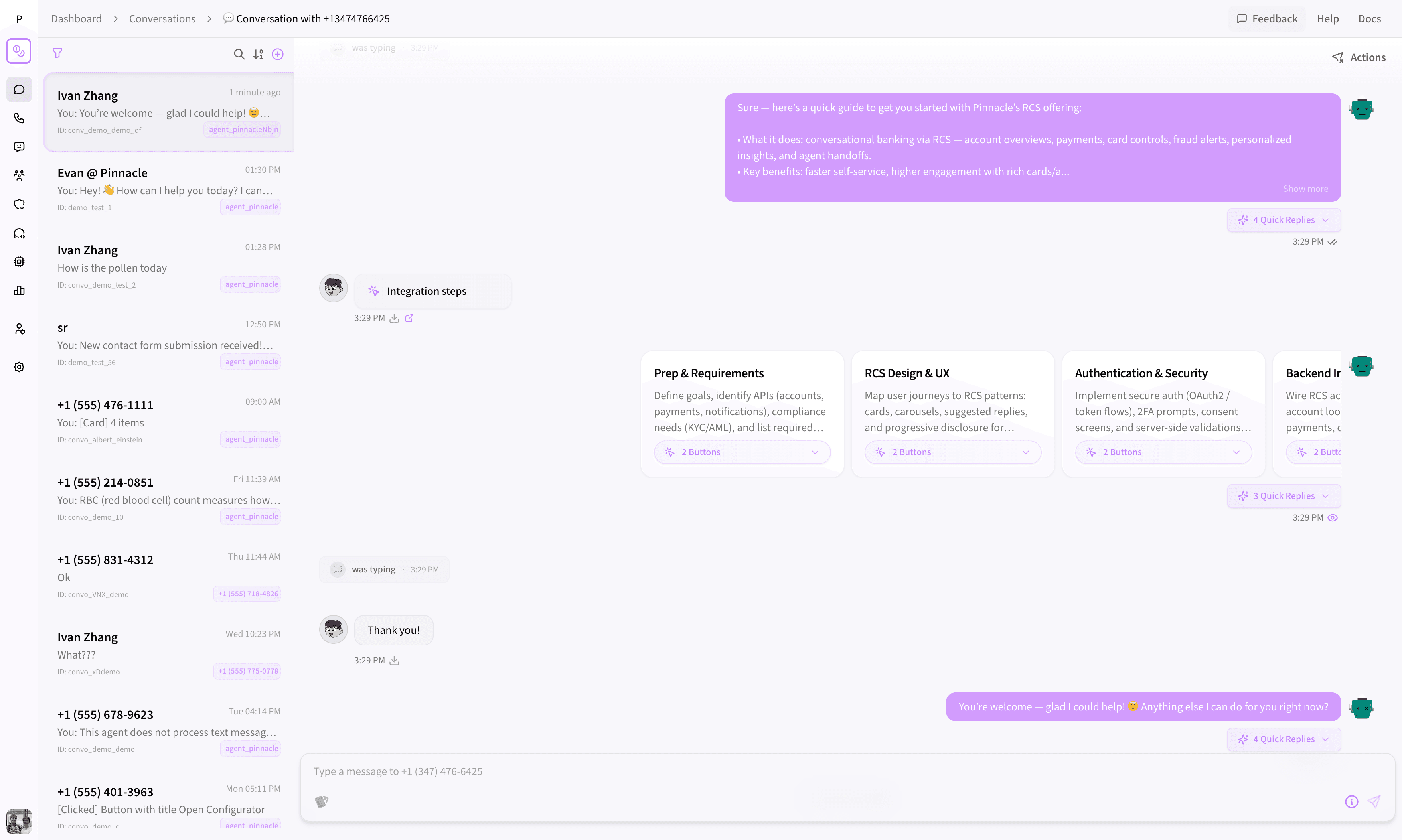 Pinnacle's conversations dashboard — a full messaging inbox with conversation threads, message composer, and contact management.
Why Do Businesses Need a Messaging Dashboard?
Most messaging APIs give you endpoints and documentation, then leave you to build the interface yourself. That means your engineering team has to design and maintain a message list, a composer, real-time status updates, contact storage, and search — on top of the core product work they're already doing.
Pinnacle eliminates that entire layer. The conversations dashboard is a production-ready tool designed for daily use by engineers, support teams, marketers, and operations staff. It's the messaging inbox businesses would otherwise have to build from scratch.
How to Send RCS and SMS Messages Without Code
The dashboard's built-in message creator lets anyone on your team compose and send messages without touching an API endpoint or writing a script.
Supported Message Types
- Rich messages (RCS): Include images, carousels, contact cards, quick reply buttons, and suggested actions
- Basic messages (SMS/MMS): Standard text and multimedia messages for broader device reach
- Fallback messages: Automatically send an SMS/MMS fallback if RCS isn't available for a recipient
Scheduling and Validation
Need to send a message at a specific time? The built-in schedule picker lets you set a future delivery window. Before any message goes out, the dashboard validates the content and shows a preview, so you know exactly what the recipient will see.
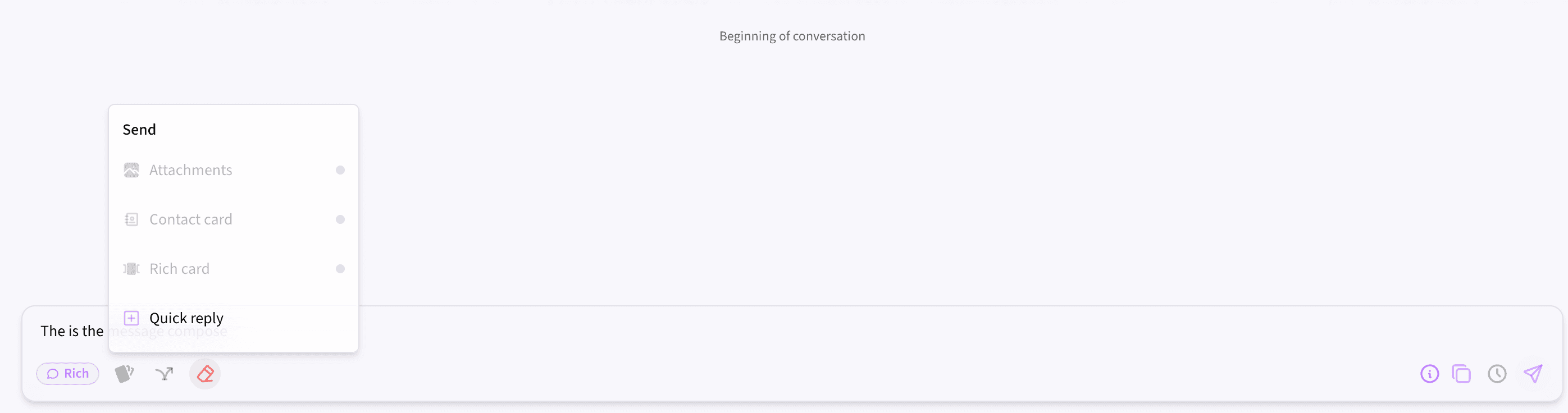 Compose rich or basic messages with attachments, quick replies, and scheduled delivery — all without touching code.
How Does Real-Time Message Tracking Work?
Every message sent through Pinnacle displays a live delivery status: sent, delivered, read, pending, or failed. These statuses update automatically as the carrier and recipient device report changes — no manual refresh needed.
For failed messages, the dashboard surfaces the specific error so you can diagnose the issue immediately instead of searching through API logs. This real-time visibility is critical for teams that need to guarantee message delivery for transactional alerts, appointment reminders, or customer support workflows.
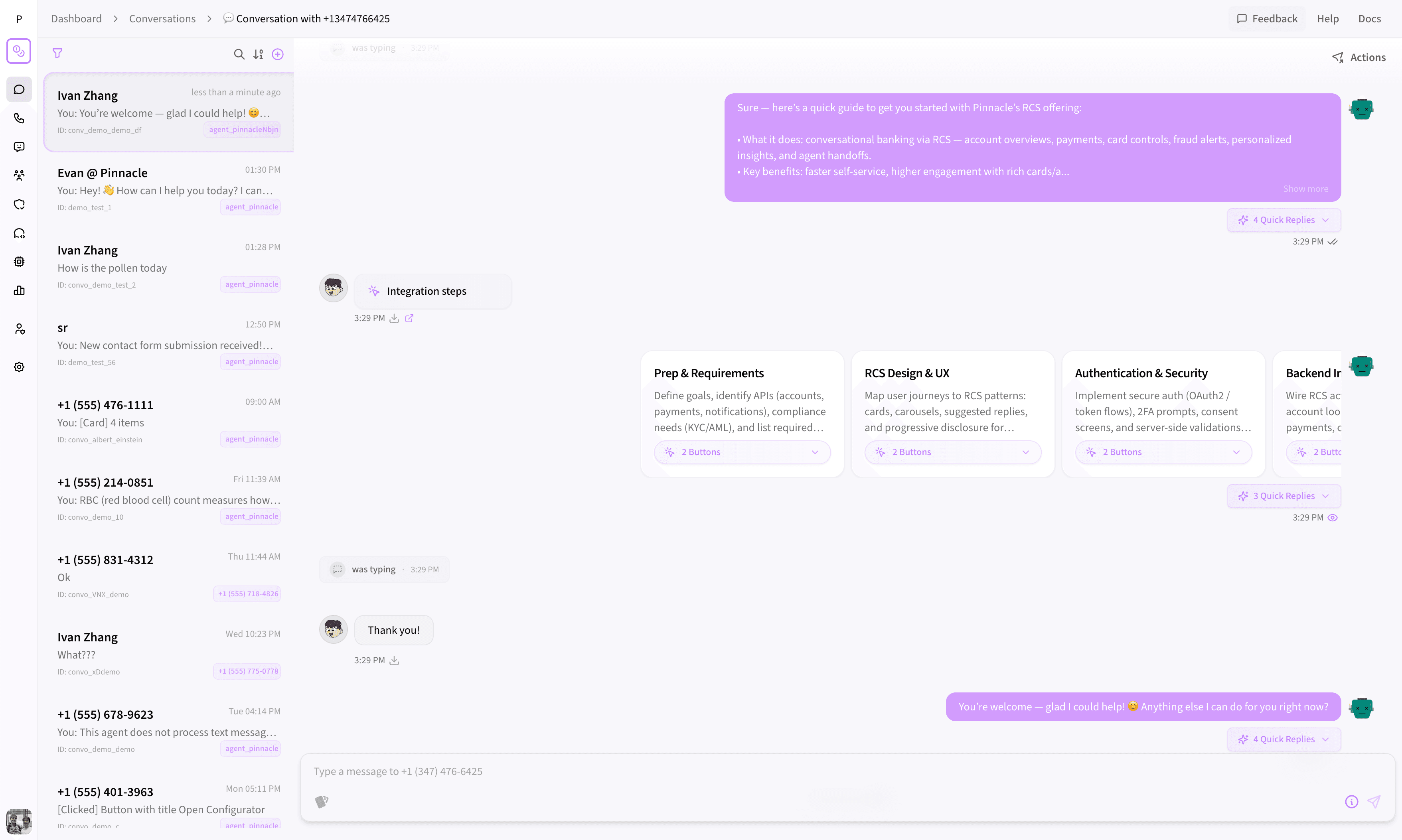 Real-time, two-way conversations with delivery status on every message.
How to Search and Filter Messaging Conversations
The conversations panel organizes every message by contact and supports three search dimensions:
- Search by sender: Find all conversations from a specific phone number or RCS agent
- Search by receiver: Locate messages sent to a particular recipient
- Search by content: Find conversations containing specific keywords or phrases
You can also sort conversations by date and filter by sender type (RCS agent or phone number), keeping the view focused on what's relevant. For high-volume accounts, this turns the dashboard into a fast, searchable messaging inbox.
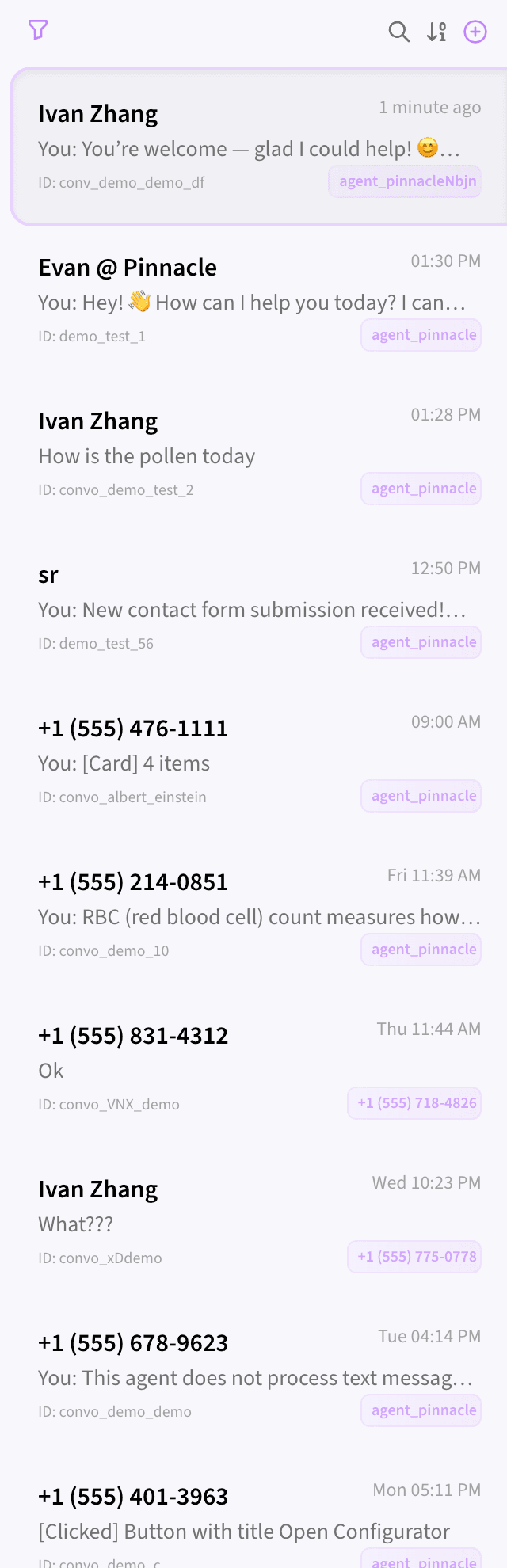 All your conversations in one searchable panel — filter by sender, receiver, or message content.
How to Respond to Customer Messages in Real Time
When a customer replies, their inbound message appears in the conversation thread instantly. You can compose and send a custom response directly from the dashboard, making Pinnacle a live two-way communication tool — not just an outbound message delivery service.
For teams running customer support, sales outreach, or appointment scheduling over RCS and SMS, this means managing the entire conversation lifecycle from a single browser tab. There's no need to build a separate chat interface or integrate a third-party inbox tool.
Contact Management: Notes, Tags, and Phone Number Lookup
Knowing who you're messaging is just as important as the messages themselves. The conversations dashboard includes built-in contact management tools that eliminate the need for a separate CRM for basic messaging workflows.
How to Save Notes on a Messaging Contact
Every conversation includes a Notes tab where your team can save context about the contact — previous interactions, account details, preferences, or follow-up reminders. Notes persist across sessions and are visible to anyone on your team who opens that conversation, so context is never lost between handoffs.
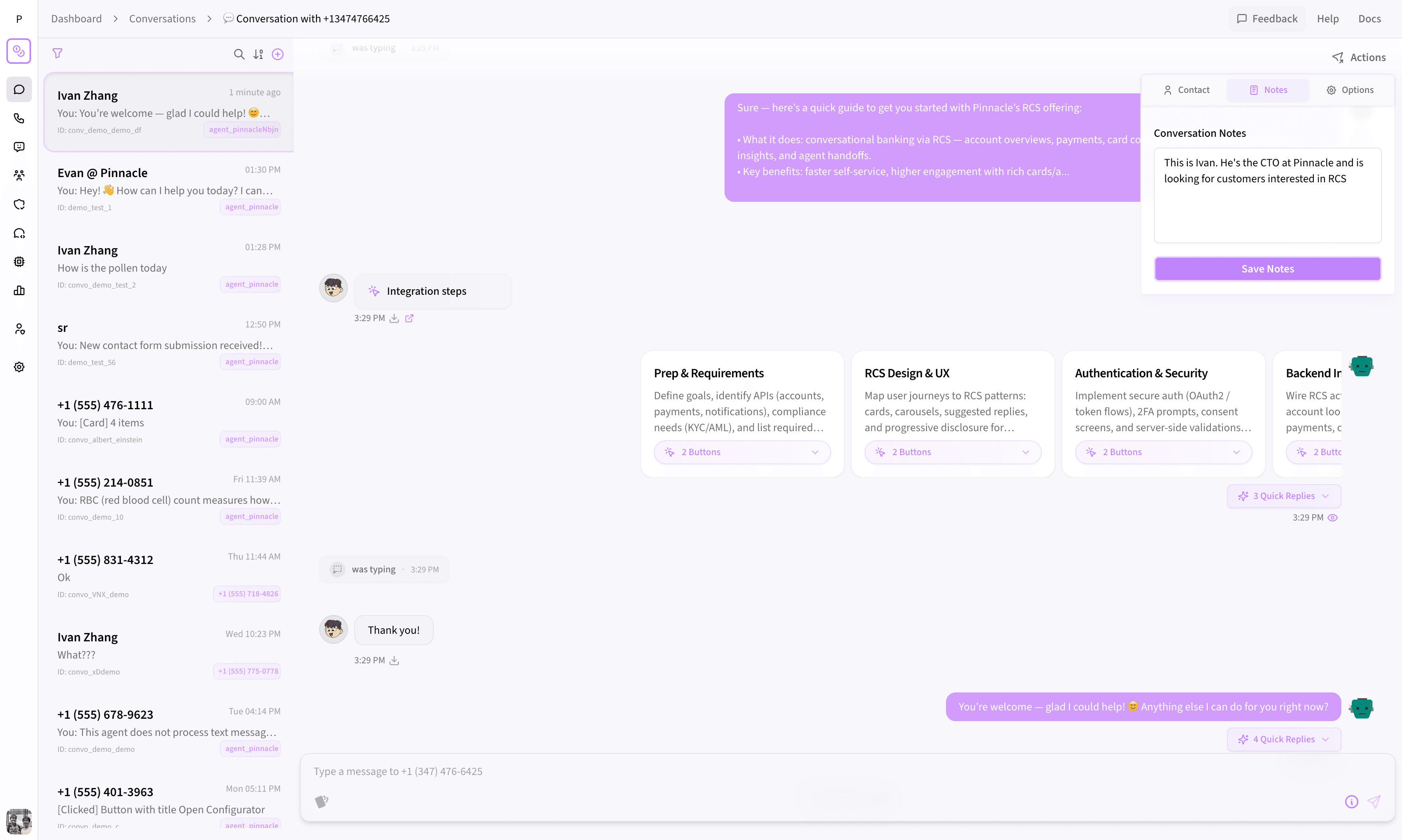 Save and share notes on any contact so your whole team stays in context.
How Phone Number Lookup Works
The dashboard includes a built-in phone number lookup tool that retrieves available information about any contact:
- Simple lookup: Returns basic details like carrier and number type
- Deep lookup: Returns comprehensive data including name, email, and additional metadata
This is useful for verifying unknown contacts, enriching your messaging records, or understanding who's reaching out before you respond. The contact details modal displays everything in a clean, organized view with name, email, tags, and description fields.
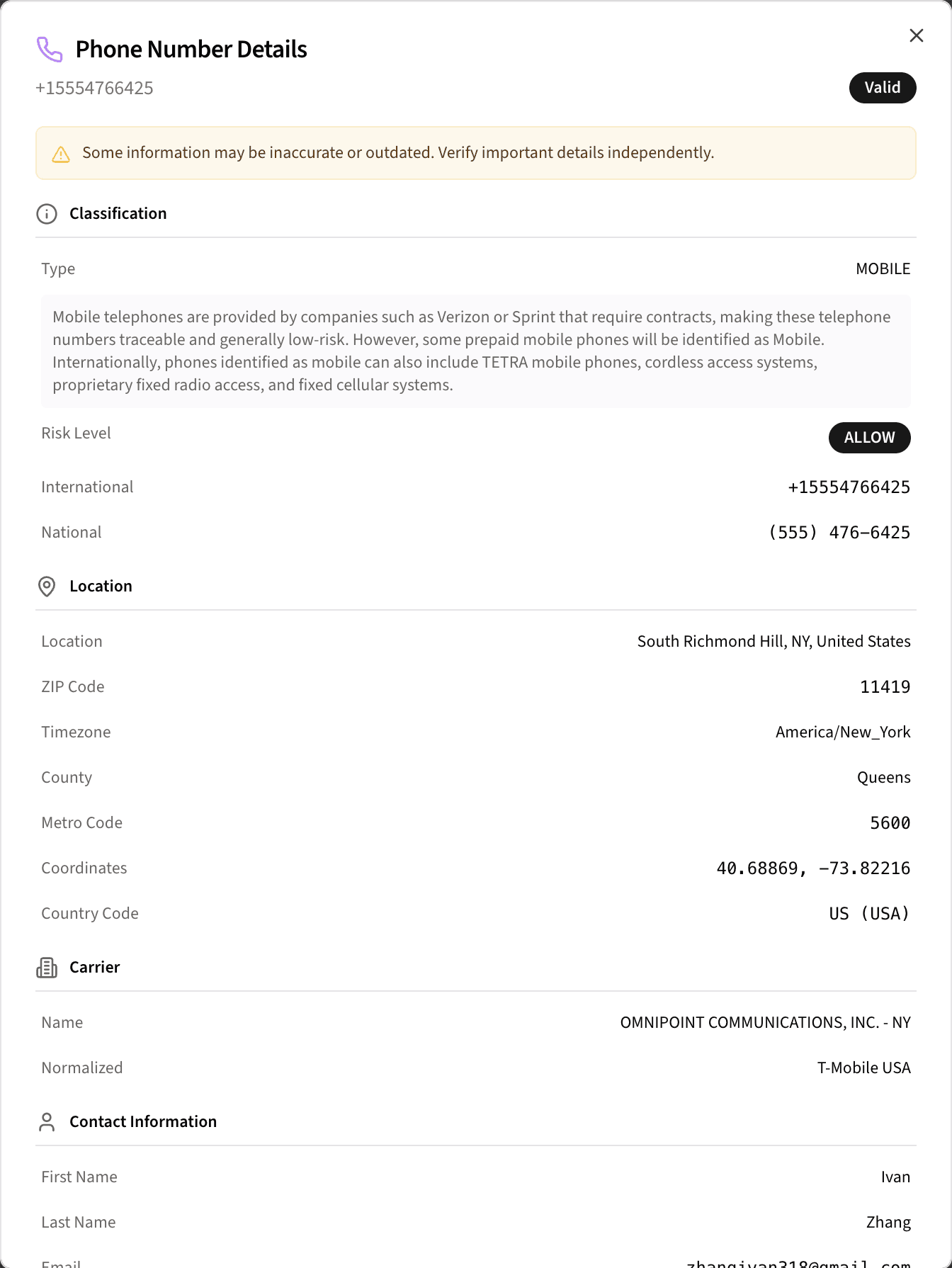 Look up any phone number for carrier info, contact details, and metadata — right from the conversation.
Conversation Filtering Options
Fine-tune your dashboard view with granular controls:
- Toggle visibility of test messages, reaction messages, and typing history
- Filter by sender type — RCS agent or specific phone number
- Sort by date to surface the most recent or oldest conversations
What Would It Cost to Build This Yourself?
To build a comparable messaging dashboard from scratch, a team would typically need to:
- Design and build a message list component with search, sort, and pagination
- Create a message composer supporting RCS, SMS/MMS, attachments, scheduling, and validation
- Implement real-time status updates via WebSockets or polling
- Build a contact management system with notes, metadata, and phone number lookup
- Handle message threading with proper ordering, status badges, and error display
- Add filtering and search across conversations, senders, and message content
That's typically 4-8 weeks of frontend and backend engineering, plus ongoing maintenance. With Pinnacle, it's included in your account from day one — already built, already tested, and already handling real-time updates.
Can I Disable the Conversations Dashboard?
Yes. The dashboard is enabled by default because most teams need it immediately, but it can be disabled if you prefer to handle everything through the Pinnacle API. You can send SMS, send MMS, and send RCS programmatically. This flexibility means Pinnacle adapts to your workflow — whether you want a no-code interface, a fully programmatic integration, or both.
Want More Control? Build Your Own with Pinnacle's SDKs
The built-in dashboard covers the majority of use cases, but some teams need deeper customization — branded interfaces, custom workflows, or tighter integration with internal tools. For those cases, Pinnacle's SDKs give you full programmatic access to send messages, track delivery statuses, and manage contacts so you can build your own conversations UI with exactly the controls you need.
Use the ready-made dashboard to get started fast, then graduate to a custom build when your requirements demand it — or run both side by side.
For enterprise use cases or custom integration support, reach out to founders@pinnacle.sh.
Frequently Asked Questions
Do I need to write code to use the conversations dashboard?
No. The conversations dashboard is a fully no-code interface. You can send messages, manage contacts, track delivery statuses, and respond to customers entirely from your browser.
What message types can I send from the dashboard?
You can send Rich messages (RCS) with images, buttons, carousels, and contact cards, or Basic messages (SMS/MMS). You can also configure automatic SMS/MMS fallback for recipients who don't support RCS.
Does the dashboard update in real time?
Yes. Message statuses (sent, delivered, read, failed) update automatically as the carrier reports changes. Inbound messages from customers appear instantly in the conversation thread.
Can I use the dashboard and the API at the same time?
Yes. Messages sent via the API (using the Send SMS, Send MMS, or Send RCS endpoints) appear in the dashboard, and messages sent from the dashboard are accessible via the API. They work together seamlessly.
Is the conversations dashboard included in all Pinnacle plans?
Yes. The conversations dashboard is included with every Pinnacle account and enabled by default.
Key Takeaways
- No code required: Send, receive, and manage RCS and SMS messages from a ready-made web interface
- Real-time message tracking: Delivery statuses update live — sent, delivered, read, or failed — with error details for troubleshooting
- Built-in contact management: Save notes, look up phone numbers, and enrich contact data without leaving the dashboard
- Full message composer: Support for RCS and SMS/MMS with attachments, quick replies, fallbacks, and scheduled delivery
- Searchable messaging inbox: Find any conversation by sender, receiver, or content
- Enabled by default: Start managing messages the moment you sign up — no setup required
- Saves weeks of engineering time: Skip building a custom messaging UI and focus on your core product
Get Started with the Conversations Dashboard
The conversations dashboard is live at app.pinnacle.sh/dashboard/conversations. Log in to your Pinnacle account and start managing messages today.
Want to understand how your messages are performing after you send them? The Pinnacle analytics dashboard tracks delivery rates, reply rates, read rates, and interaction metrics in one filterable view.
Want to see how Pinnacle fits your stack? Book a 30-minute call with one of our engineers — we'll walk through your use case and get you live.