
RCS vs. SMS vs. iMessage: What's the Real Difference?
Messaging is like breathing—effortless, constant, and essential. But beneath the surface lies a complex ecosystem of technologies. We demystify SMS, iMessage, and RCS.
Sean
The Messaging Maze: Untangling RCS, SMS, and iMessage
Imagine you're trying to send a letter. With SMS, it's like a plain postcard – gets the message across, but no frills. iMessage is a beautifully designed, sealed envelope, but it only works if both sender and receiver use the same postal service. RCS? That's the modern parcel delivery service, offering tracking, richer content, and more. Each has its strengths, limitations, and a story to tell.
Why the "Green Bubble vs. Blue Bubble" Debate Isn't Just About Aesthetics
The infamous "green bubble vs. blue bubble" isn't just about color; it represents a fundamental divide in the messaging world. It's a visual cue that signifies whether your message is traveling over Apple's proprietary iMessage network (blue) or falling back to the ancient SMS protocol (green). This distinction is a constant reminder of the interoperability challenges and compatibility issues that plague our cross-platform communication, highlighting the richer experience enjoyed by those within the same walled garden.
SMS: The Grandparent of Messaging
Before the internet in our pockets, there was SMS. It's the OG, the standard bearer, the foundation upon which much of our digital communication is built.
A Trip Down Memory Lane: How SMS Took Over the World
Do you remember the days of T9 predictive text and excitedly waiting for a reply to your 160-character message? SMS, or Short Message Service, was revolutionary when it launched in the early 90s. It liberated us from phone calls, allowing quick, discreet communication without relying on a data plan or an internet connection. It was universally adopted because it worked on virtually any mobile phone, anywhere in the world, simply by piggybacking on existing cellular voice networks or any cellular network, using just a phone number and not requiring Wi-Fi. This simplicity was its superpower.
The Bare Bones: What SMS Offers (and Lacks)
SMS is remarkably basic. It's limited to short text messages, typically 160 characters per segment. If you send a longer message, it's broken into multiple SMS parts and reassembled by your phone. Want to send a photo or emojis? That requires MMS (Multimedia Messaging Service), a clunkier extension of SMS that often struggles with quality and reliability. There are no read receipts, no typing indicators, no high-quality media sharing, and no end-to-end encryption. It's like sending a telegraph in the age of email—functional, but primitive.
iMessage: Apple's Walled Garden
For Apple users, iMessage isn't just a messaging app; it's a core part of the iPhone experience. It's a testament to the power of a unified ecosystem.
The iOS Advantage: Seamless Integration and Rich Features
iMessage debuted in 2011 and immediately transformed how iPhone users communicated. Suddenly, within the Apple ecosystem, users could send high-quality photos and videos, see when someone was typing, get read receipts, react to messages, and enjoy group chats that actually worked. It seamlessly integrated into the existing Messages app, intelligently switching from SMS to iMessage when both parties had Apple devices. This integration is what makes it so sticky and convenient for its users.
The Blue Bubble Mystique: Why iMessage Users Love It
The "blue bubble" became a symbol of belonging, of a premium, feature-rich messaging experience. It represents a fluid, modern communication channel. Beyond the features, iMessage offers end-to-end encryption by default for messages between Apple devices, providing a significant privacy boost over SMS. This combination of rich features and enhanced security within a familiar interface has fostered immense loyalty among its user base.
The Interoperability Challenge: When Apple Meets Android
The moment an iMessage user sends a message to an Android phone user, or other Android devices, the magic disappears, and the communication reverts to basic SMS/MMS. The blue bubble turns green, and the message reverts to plain old SMS (or MMS messages for media). This isn't just an aesthetic change; it strips away all the rich features. Group chats with Android users become fragmented, media quality plummets, and the seamless experience is lost. This deliberate lack of interoperability has been a source of frustration for many and a strategic advantage for Apple in locking users into its ecosystem.
RCS: Google's Answer to iMessage (and More)
Enter RCS, Google's ambitious project to modernize text messaging for everyone, regardless of their phone. It aims to be the universal upgrade SMS desperately needs.
What Exactly is RCS? A Deeper Dive into Rich Communication Services
RCS, or Rich Communication Services, isn't an app; it's a messaging protocol, much like SMS, and any modern messaging app supports RCS. Think of it as the next-generation evolution of SMS, designed to bring many of the features we love from apps like iMessage, WhatsApp, or Signal to the standard messaging app on our phones. It's built on a global standard, meaning it's not tied to a single company or device, and aims for broad devices support.
Unlocking New Possibilities: Features That Set RCS Apart
When both sender and receiver have RCS enabled, a whole new world opens up. You get high-resolution photos and other rich media, including:
- High-quality media sharing: Send crisp photos and videos without pixelation.
- Read receipts: Know when your message has been seen.
- Typing indicators: See when someone is replying.
- Larger group chats: More participants and better management.
- Enhanced security: While not end-to-end encrypted by default across all carriers, Google Messages (the primary app pushing RCS) now offers end-to-end encryption for one-on-one chats.
- Business messaging: RCS allows businesses to engage with customers in richer ways—think interactive menus, booking confirmations, and customer support within the messaging app itself.
Essentially, RCS aims to offer the best of modern messaging apps, including rich RCS features and RCS chats, without requiring users to download a third-party application like Facebook Messenger.
Comparing the Three: A Side-by-Side Look
Let's lay them out and see how they stack up.
Feature Showdown: What Each Platform Brings to the Table
| Feature | SMS | iMessage (Apple-to-Apple) | RCS (When Enabled) |
|---|---|---|---|
| Basic Texting | Yes | Yes | Yes |
| High-Res Photos/Video | No (MMS is low quality) | Yes | Yes |
| Read Receipts | No | Yes | Yes |
| Typing Indicators | No | Yes | Yes |
| Group Chat Quality | Poor (MMS dependent) | Excellent | Good |
| File Sharing | No | Yes | Yes |
| End-to-End Encryption | No | Yes | Yes (Google Messages 1:1 chats) |
| Interactive Features | No | Yes (apps, stickers, GIFs) | Yes (business messaging, suggested replies) |
| Universal Access | Yes (any phone, any carrier) | No (Apple devices only) | Yes (most phones, most carriers) |
To see up to date RCS availability in your region, check it out using our tool here.
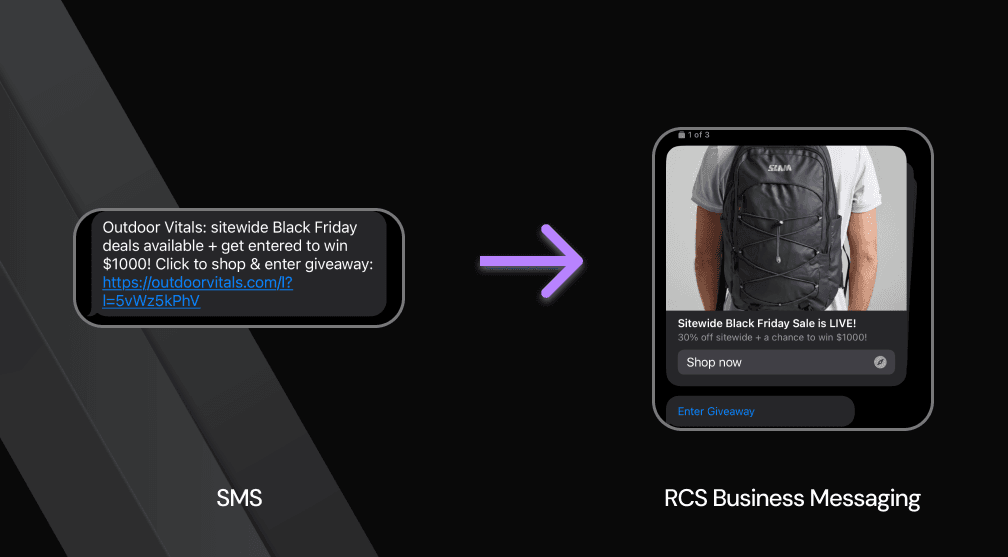 RCS vs SMS vs iMessage comparison
Security and Privacy: Who's Protecting Your Conversations Best?
When it comes to security, iMessage stands out with its end-to-end encryption by default for all Apple-to-Apple communications. This means only the sender and receiver can read the messages. SMS, on the other hand, offers no encryption and is notoriously insecure. RCS, especially through Google Messages, now offers end-to-end encryption for one-on-one chats, which is a significant step forward. However, the fragmented nature of RCS means not all implementations guarantee this level of security across the board. For true universal private communication, third-party apps like Signal remain the gold standard.
The User Experience: From Simplicity to Sophistication
SMS is simple to a fault—it just works, but without any modern functionality or amenities. iMessage offers a sleek, intuitive, and feature-rich experience, but only within its specific ecosystem. RCS aims for a happy medium: the universal accessibility of SMS combined with the rich features and modern feel of apps like iMessage, without requiring a separate app download, effectively becoming the native messaging solution. The user experience with RCS, when fully enabled through appropriate messages settings, is far superior to traditional SMS, bringing standard messaging and its advanced chat features into the 21st century.
The Future of Messaging: Where Do We Go From Here?
The messaging landscape is constantly evolving, driven by user demand for richer, more secure, and more interconnected communication.
The Push for Universal RCS: Breaking Down Barriers
Google is leading the charge for universal RCS messaging adoption, viewing it as the natural successor to SMS for everyone. Their argument is compelling: why should modern smartphone users be stuck with archaic SMS features when a superior, open standard exists, allowing them to use RCS? The ultimate goal is to break down the "green bubble" barrier, allowing seamless, feature-rich communication between Android and Apple users alike, without either party having to download a separate app. The pressure on Apple to adopt RCS is mounting, not just from Google but from regulators and consumers who desire true cross-platform messaging parity. Whether Apple will concede and embrace an open standard or continue to leverage iMessage as a powerful ecosystem lock-in remains one of the most critical questions in the future of personal communication.
Get Started with RCS on Pinnacle
Want to see how Pinnacle fits your stack? Book a 30-minute call with one of our engineers — we'll walk through your use case and get you live.